




Are you no longer able to control your stove using the MY PIAZZETTA app? Unable to connect, lost Wi-Fi after changing provider, or having trouble registering your stove? Don’t worry! Follow our advice to regain optimal control.
Case No. 1: First connection to your PIAZZETTA pellet stove
The first thing to do is install the MY PIAZZETTA app on your smartphone, available on Android or iOS.
Then consult our installation guide for the MY PIAZZETTA Wi-Fi kit and follow the steps:
Case No. 2: Unable to register the stove
Make sure you have turned off your phone’s Wi-Fi before proceeding with registering the stove.
When registering the stove, if a MAC code appears after entering the serial number, this means the stove is already registered to another account.
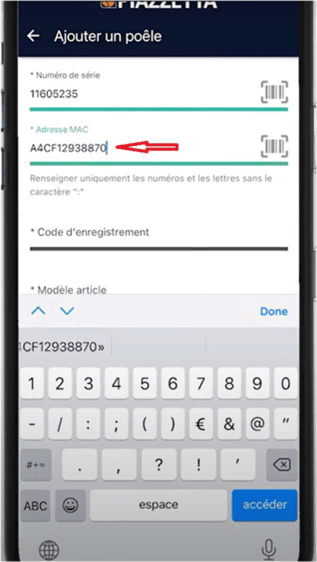
To register the stove, it must be removed from the other account.
Two solutions are available to you:
- You have the login details for the previous account: sign in and easily remove the stove.
- You do not have the login details: you will need to request removal from Piazzetta. To do this, you must provide a photo of the Wi-Fi kit labels showing the MAC number, as well as the stove’s serial number.
Case No. 3: You have changed your internet provider and can no longer connect your stove
Download the installation guide for the PIAZZETTA Wi-Fi kit following a change of provider and follow the steps.
To go further:
Visit our YouTube channel and watch how to install the app in our step-by-step video: